$ steward

Early test release · OpenVMS x86-64

OpenVMS system management, in your browser.

Steward gives your OpenVMS systems a fast, modern web console for users, rights and privileges, and lets OpenVMS itself decide who may do what. Sign in with your OpenVMS account. Every request runs as you.

  • NativeC99 on OpenVMS
  • PCSIone kit, one command
  • MITopen source

01 / Why Steward

Built the OpenVMS way.

Most web consoles bolt their own permissions onto the system they manage. Steward does the opposite: OpenVMS stays the single authority, and Steward stays out of its way.

Every request runs as you

Each request takes on your own OpenVMS identity, a persona. Your privileges and rights identifiers decide what you may see and change, exactly as at a terminal. There is no second set of permissions to manage, and nothing to drift out of step.

Least privilege, provably

The service account runs with IMPERSONATE, TMPMBX and NETMBX. SYSPRV is switched on only for the instant a persona is created, and the server checks after every request that it is off again. If it is not, the process stops rather than carry on.

It speaks VMS

Screens laid out as AUTHORIZE lays them out. DCL wildcards in every filter. Messages in %FACILITY-S-IDENT form, with the system's own text when OpenVMS says no. Privileges you switch on and off like SET PROCESS/PRIVILEGE.

Native, with no runtime to install

A small C program on OpenVMS, run as a pool of FastCGI processes behind lighttpd. No Java, no Node.js, no Python on the server. One PCSI kit and one configuration procedure, with startup and shutdown hooks like any layered product.

Security-audited code

Static analysis, sanitizers, fuzzing and secret scanning run on every change, and every phase closes only after a security review. What each review found, and the test that now guards it, is published with the source.

A record of every change

Each sign-in, privilege switch and change is logged with who made it, from where, and what OpenVMS answered. Passwords are never recorded. Break-in evasion applies to each browser separately, even behind a reverse proxy.
02 / Screens

Modern on the surface. DEC underneath.

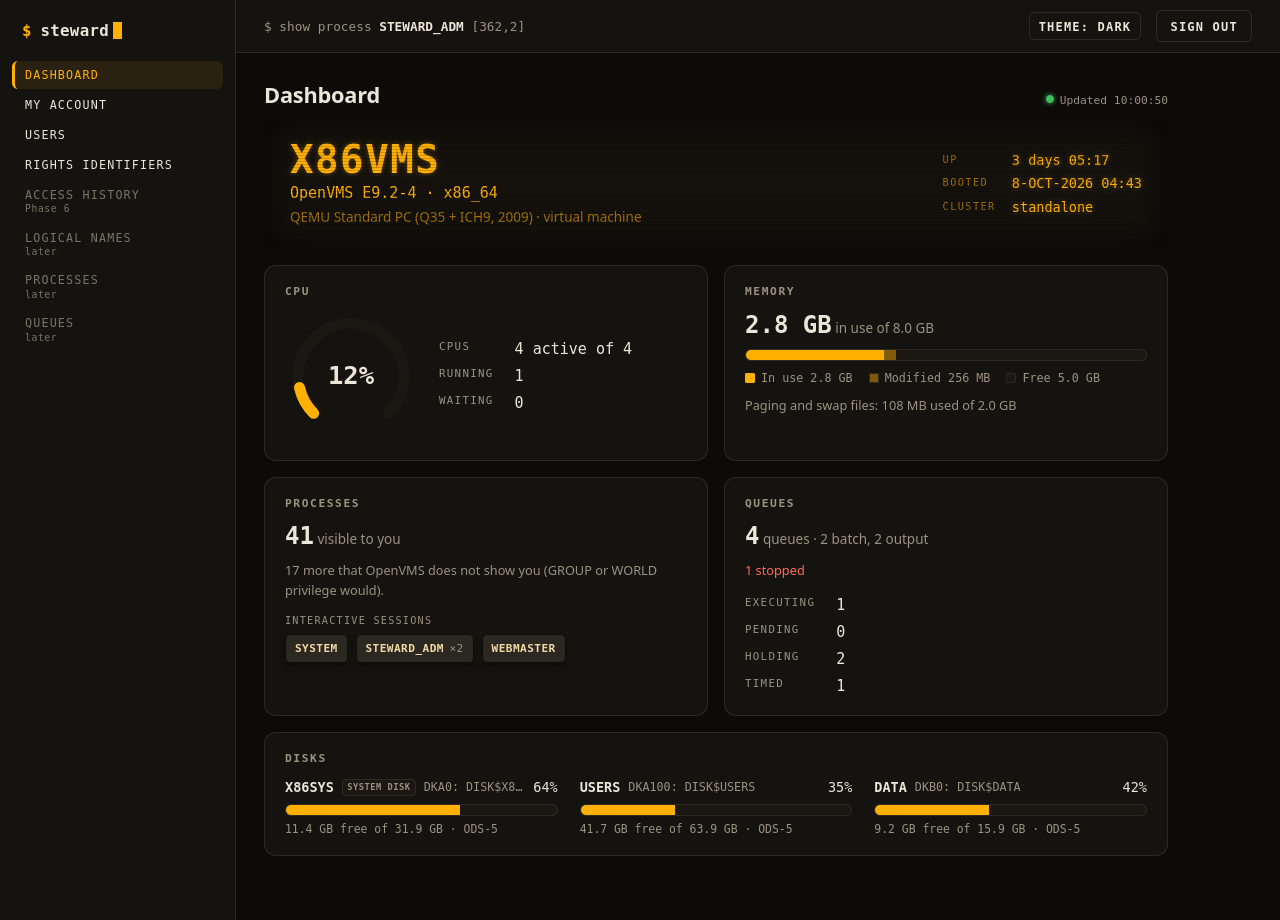
A VT-amber terminal theme for the night shift, a clean light theme for the day, and LK201 keycaps for privileges and identifiers.

The Steward dashboard in the amber terminal theme
The dashboard: the system at a glance, read as you and refreshed in the background.

03 / How it works

Small moving parts. Each one checked.

  1. You sign in. SYS$ACM checks your password, so expiry, DISUSER, login hours and break-in evasion all apply. A failed attempt is charged to your browser's address, never to the proxy's.
  2. Each request becomes you. Steward creates your persona, applies the privileges you switched on, does the work, and drops the persona before it answers. A request that would leave one behind stops the process instead.
  3. OpenVMS decides. If the system would refuse you at a terminal, it refuses you here, and you see its own message: %SYSTEM-F-NOSYSPRV, operation requires SYSPRV privilege
  4. Nothing else gets in. Only your lighttpd can reach the pool: it adds a secret that the pool requires, so no other process on the system can talk to it directly. Sessions are random tokens, stored only as hashes, bound to your CSRF token and same-origin requests.

04 / Today and next

Users and rights first. The whole system next.

In the release

  • A dashboard: OS, hardware, uptime, CPU, memory, disks, processes, queues and cluster at a glance
  • List, filter and read users: everything AUTHORIZE SHOW shows
  • Modify users: owner, flags, days and hours, privileges, quotas
  • Set passwords, pre-expired if you like; change your own, even when it has expired
  • Rights identifiers: create, rename, attributes, delete; grant and revoke
  • Switch your authorized privileges on and off, per session
  • An audit log of every sign-in and change
  • Light and dark themes

05 / Install

Three commands and one include line.

$! once, as SYSTEM
$ PRODUCT INSTALL STEWARD /SOURCE=dev:[dir]
$ @STEWARD$ROOT:[COM]STEWARD$CONFIGURE
$! add the include line it prints to LIGHTTPD.CONF
$ @STEWARD$ROOT:[COM]STEWARD$CONTROL START
STEWARD: start submitted as STEWARD

You will need

  • OpenVMS x86-64 V9.2
  • TCP/IP Services and the SSL3 kit (OpenSSL 3)
  • lighttpd for OpenVMS, which serves Steward
  • HTTPS at the browser: a TLS proxy in front, or TLS in lighttpd

This is an early test release. Try it on a test system first, and tell us what you find.

Download the kit